Peregrine OS is a set of sales and market intelligence tools from Peregrine Intelligence. They all run on one engine the company calls Flightpath.AI. We used two of the tools hands-on, Harrier (job posting signals) and Caracara (trade news digest), and counted everything below ourselves. Here's our honest review.
Our verdict: Peregrine OS is the rare new-business tool a small agency can afford to just try. The data earns trust, because every signal links to a primary source, and both tools we used surfaced leads that were current that week. The suite is still young: contact data is missing, two tools are unreleased, and we hit one bug. For a small agency or a solo consultant, it is worth a trial today.
What we liked
- Every row links to the original job posting or article, so any signal verifies in one click
- Per tool pricing from $39/mo, each tool with a 14 day free trial, no bundle required
- Signals were fresh: 20 of our 73 Harrier rows were new on the test day
- Caracara summaries stand in for a stack of paywalled trade subscriptions
- Full JSON data export and self serve account deletion
What we would improve
- No contact names or emails on signals yet (the founder says they are on the roadmap)
- Caracara's AI summary box failed twice in our test and used up its daily limit
- No API or MCP endpoint for AI assistants
- Two of the nine tools are still Coming Soon
What Is Peregrine OS?
Peregrine OS is not one bundle. It is nine separate tools, each named after a bird of prey, and you subscribe only to the ones you want:
- Harrier ($69/mo): job posting signals, such as in-housing moves, agency gaps, and leadership vacuums (tested below)
- Caracara ($39/mo): daily ad and marketing trade news, scored and categorized (tested below)
- Eagle ($69/mo): new CMO and VP Marketing appointments
- Kingfisher ($69/mo): freshly funded DTC and MarTech companies
- Falconet ($39/mo): small business news, funding, policy, growth
- Quickstrike ($75/mo): pre call intel on a single contact
- Magpie ($129/mo): consumer brand strategic briefs
- Kestrel ($189/mo) and Merlin ($229/mo): still Coming Soon
- Pro add-on ($29.99/mo): on demand feed refreshes and doubled save limits
Getting started is easy. Sign in is a passwordless magic link. We created a fresh account with it, and the confirmation email arrived in seconds and worked on the first try. Without a subscription, a tool URL just sends you back to the dashboard. So the 14 day free trial that every tool carries is the only way to see live data.
How Do You Find Companies About to Leave Their Ad Agency?
You watch their job postings. That is Harrier’s whole idea. When a company starts hiring in house for work its agency used to do, that posting is often the first public clue that the company is getting ready to change agencies, before anything official is announced. That signal cuts both ways: it is a threat if you are the company’s current agency, and an opening if you are not. Accounts often move when something is changing, and this is the moment they can become vulnerable.
Harrier tracks marketing job postings across a rolling 31 day window and sorts them into four signals: Leadership Vacuum (an open C-suite or VP marketing role), In-Housing (building an internal creative or paid media team), Agency Gap (hiring an employee for work that companies usually pay an agency to do), and Team Expansion. On our test day in mid September 2026 it held 73 active signals: 26 Leadership Vacuum, 21 Team Expansion, 20 Agency Gap, and 6 In-Housing, with 20 of them new that day. The feed leaned toward agency side roles, B2B SaaS, DTC and CPG, and financial services.
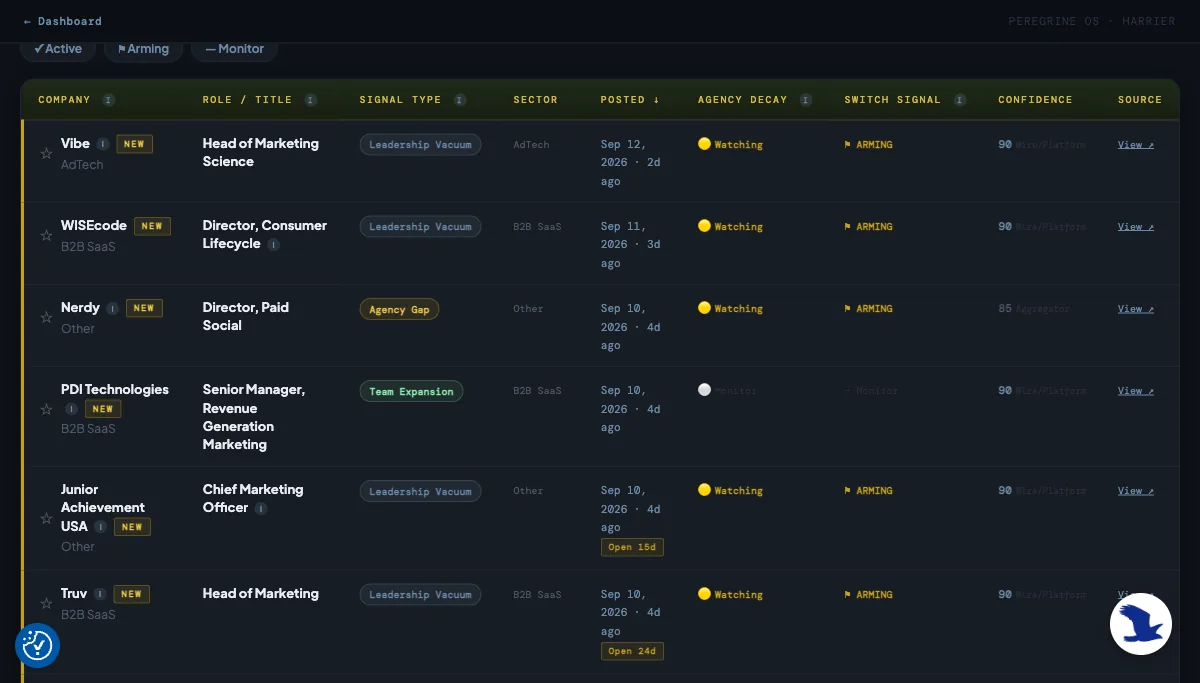
The live feed. Every row links to the original posting, usually on the company’s own hiring system, so any signal can be checked in one click.
The table earns trust the simple way. Every one of the 73 rows links to the original job posting, usually on the company’s own hiring system (Lever, Greenhouse, Ashby), so you can verify any signal yourself in one click. The filters go deeper than we expected: postings found late, a budget named in the listing, several openings at once, and an Agency Decay and Switch Signal pair that tracks how far a company has drifted from its current agency.
That pair deserves one more line, because it is the heart of the product. Agency Decay shows the drift in three steps: Monitor (nothing yet), Watching (signs are building), and Marked (the relationship looks close to ending; six companies sat at this stage in our export, including Dropbox and Universal Music Group). Switch Signal grades the evidence behind that read, and its top tier, Confirmed, only fires when the posting itself names the agency being replaced. It never fired across our 73 rows, so when you do see it, treat it as rare, real proof.
Reading Harrier's Signals Without the Jargon
If a term like AOR gap is new to you, the built in assistant chat solves that. We asked it what the tags mean. It came back with a simple list of definitions: each tag defined, why it matters, a threat versus opportunity cheat sheet with urgency ratings, and examples pulled from live rows in our own feed. You do not need to know the industry jargon to start using this.
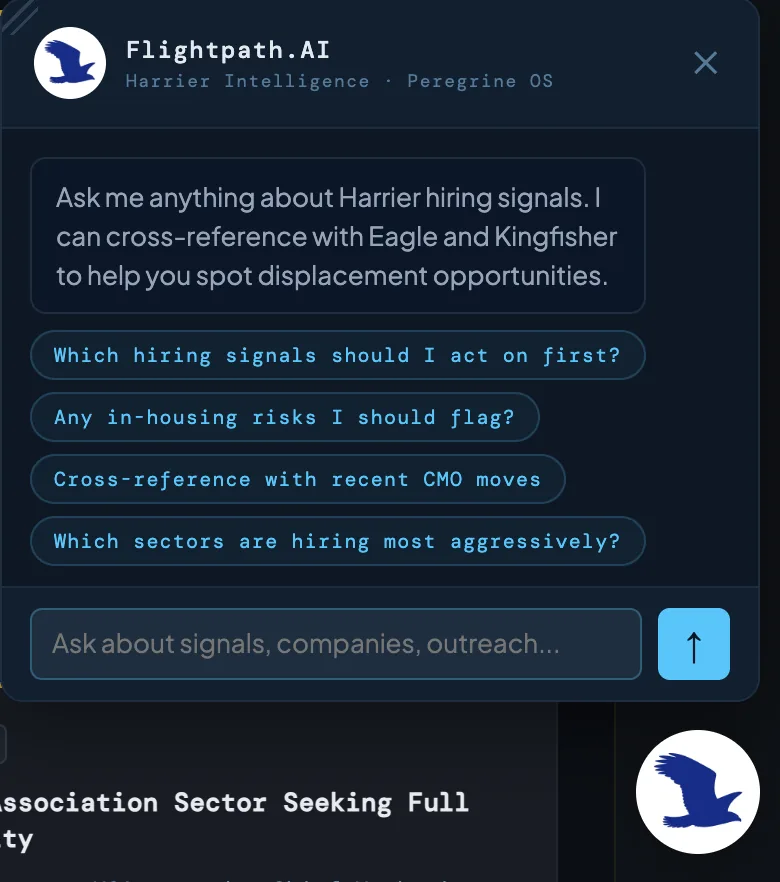
The built in assistant on the Harrier feed. Ask what a tag means, or which signals to act on first, and it answers from your own live rows.
The Terrain Signal Box is the AI layer on top of the feed. We ran it twice and both times it wrote six short strategic signals from that week’s rows. Two examples from our runs. It noticed that Webflow, Truv, Leap, and WISEcode all posted senior marketing leadership roles in the same week, grouped them into one signal, and read it as B2B SaaS companies rethinking their marketing strategy, possibly open to outside partners while the seat is empty. Another signal grouped Verizon, Nerdy, and IDT hiring their own paid media managers, and read it as advertisers taking budget control back from agencies.
Which Signals Matter for Your Kind of Agency?
The feed serves every kind of agency at once, so your first job is knowing which rows are yours. We had our AI assistant classify our 73 row export. It split into paid and media roles (29), general marketing leadership (18), revenue operations and analytics (11), social and creator (2), content (1), and some noise. In other words, some of them are meant for you.
We sell SEO and content services. Here is how we are turning the feed into a lead list for that business. The key is to read two things together: the signal type, and the words in the job title. The signal type tells you something is changing at the company. The job title tells you which budget is moving, so you know whether the lead is for you or for a different kind of agency.
Three combinations stood out when we filtered the feed. First, Leadership Vacuum plus a role that has been open for 25 days or more. This company has been trying to hire a marketing leader for weeks and cannot close the search. Work keeps piling up while the seat stays empty. Our bet is that this makes them the most open buyer of a simple offer: results now, without waiting for the hire. Second, Team Expansion plus a content or growth job title. This company just decided to spend money on organic marketing, and the posting itself is the proof. Whoever they hire will need early wins in their first quarter, so the pitch is to be exactly that. Third, Agency Gap plus an SEO or content job title, with Agency Decay at Watching or Marked. This company looks ready to pull SEO or content work away from its current agency. That seat is opening right now, and this is the short window to introduce yourself before the decision is final.
One more thing we liked: because every row links straight to the original posting, you can go past the title in one click. We went a step further and had our AI assistant open the postings and read the full descriptions (57 of the 73 were still reachable). That reading turned up seven postings that mention SEO in the body, and two of them even ask for answer engine optimization (AEO) by name. For us that meant seven leads we would have missed if we had only read the titles.
Who Else Can Use Job Posting Signals?
We used Harrier to build a lead list, but the same data supports other jobs. The clearest one is defense. Put your own clients on the feed and watch for in-housing hires or Agency Decay movement. Winning a new account is half the game; knowing three months early that you might be losing one could be worth even more.
The signals also work for people who are not agencies at all. A martech vendor can time its outreach to companies that just hired a new marketing leader, because a new leader usually re-picks the tool stack. A fractional CMO or interim consultant can work the long open Leadership Vacuum rows, where hiring has stalled and the work keeps piling up. Recruiters can read the same rows in reverse: a leadership search that has been open for a month is a company that needs help with the search itself. One dataset, four kinds of buyers, depending on which column you sort by. And job postings are not the only timing signal in the suite. Kingfisher does the same job with funding raises, because money that just arrived is usually followed by hiring and spending.
Caracara: The Trade News Layer
Caracara held 267 stories over its rolling 10 day window. Stories are sorted into Brand Moves (80), Industry Trends (60), Agency News (48), MarTech & AdTech (48), and Platform Updates (31). Each story carries a 1 to 10 relevance score, which rates how much the story matters for finding new business. In practice it works as a skim filter: read the 9s and 10s first, and only dig into the rest when you have time. On our test day the highest scored story was WPP taking Coca-Cola’s global media account, which is exactly the kind of news an agency wants to see first.
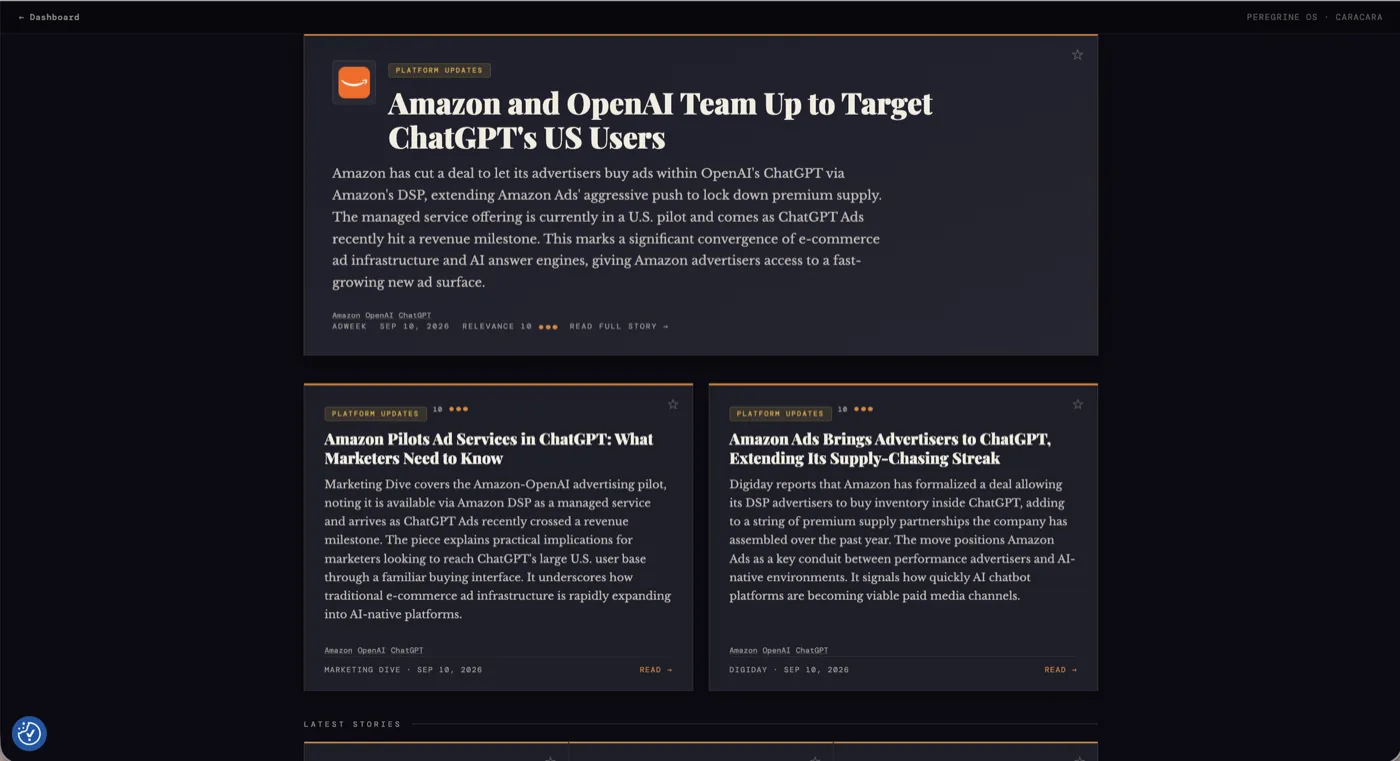
The Caracara feed. Each story gets a category, a 1 to 10 relevance score, and a link to the original article.
The sources are mostly the right ones: Adweek, Digiday, AdExchanger, Marketing Dive, Ad Age, though about one story in ten is a PR Newswire press release rather than reporting. There is also a quiet money saver here. Much of this trade press sits behind paywalls. When we clicked through on the WPP story, Ad Age showed two paragraphs and then a subscribe wall, but Caracara’s card had already given us the substance. A three sentence summary is not a substitute for full reporting when you need detail. But for daily scanning, the $39 feed quietly stands in for a stack of trade subscriptions that each cost more than Caracara does.
The clever part is entity cross tagging. Click a company chip on any story and the feed instantly filters to every story about that company. WPP collapsed 267 stories to 15 in our test. And when the engine holds signals about that company in another feed, the card grows a small cross feed link: a Coca-Cola story sprouted a Harrier link. The last step is still manual, because the link drops you at the top of the other feed and you retype the company name yourself. Even so, the two layers together feel like one graph, not nine silos.
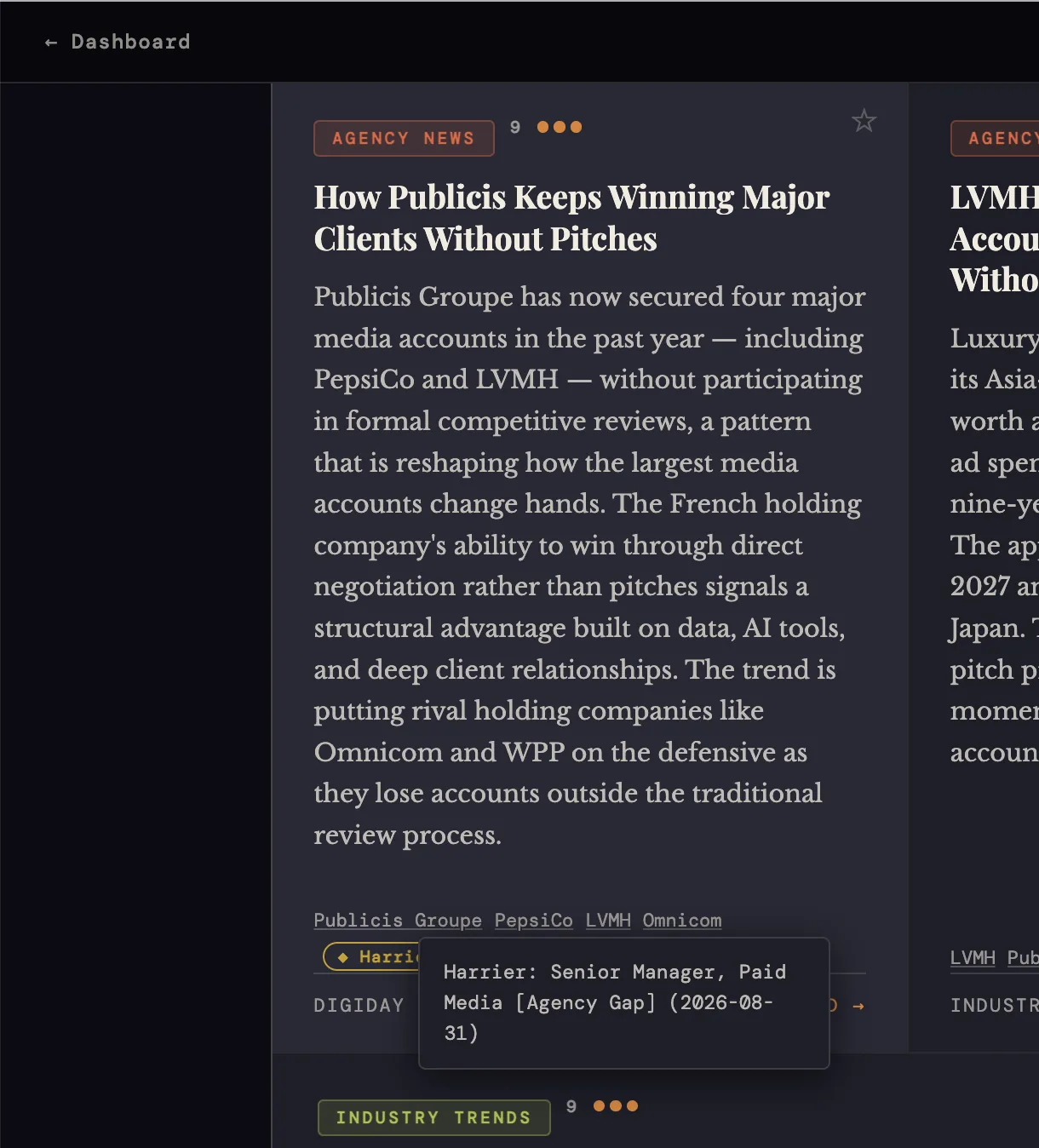
Entity cross tagging in action. A Publicis story carries a Harrier chip, and hovering it reveals the exact hiring signal behind it: a Senior Manager, Paid Media posting tagged Agency Gap.
The MarTech & AdTech tab has a second job for anyone who advises clients on their stack. It shows you the tools your clients will ask about next quarter, such as cookie deprecation fixes, MMM adoption, and measurement moving in house, before they ask. A news tab that doubles as prep time.
One consistency gap: the assistant chat that explains Harrier’s jargon does not exist in Caracara. When a story’s significance needs unpacking, you are on your own.
Where It Broke
Caracara’s on demand Terrain Signal Box failed twice in a row during our testing. The failed attempts still counted against the one per day generation limit, so the feature stayed locked until midnight UTC without ever producing output. Harrier’s version generated fine, so this looked like a bug rather than a limitation of the feature.
Is Peregrine OS a Good Winmo Alternative?
The established tool in this space is Winmo, now part of MediaRadar. It is built for large BD teams, and its entry price is around $10,000 a year. Plenty of small agencies and consultancies simply cannot justify that. For them, Peregrine is an excellent alternative. It covers the jobs that matter most in new business, at $39 to $129 a month per tool: Harrier and Caracara tell you when a company is worth calling, Eagle names the new CMOs and marketing VPs as they take the seat, and Quickstrike briefs you on a person before the call. Every tool starts with a free trial and fits on a personal card. The one thing you still bring yourself is the contact’s email, and inexpensive enrichment tools cover that. Contact data is also on Peregrine’s own roadmap, so even that gap may close over time. And if your team already lives in Winmo, Peregrine still earns its keep as a timing layer on top.
| Winmo | Peregrine OS | |
|---|---|---|
| Entry price | Around $10,000 a year | $39–$129 a month per tool |
| Built for | Large BD teams | Small agencies, consultants, solo BD |
| Free trial | Demo on request | 14 days on every tool |
| Contact data | Included | Not yet, on the roadmap |
What We Would Ask For Next
Three requests, all small next to what is already built. First, a “who is this lead for” tag on each row, read from the posting body rather than the title. Second, contact info on rows, even a best guess. When we asked, the founder told us contacts and emails are on the roadmap, so this one may already be on its way. Third, an API or MCP endpoint. Today the only way an AI assistant can read these feeds is by driving a logged in browser: fetching the page without logging in returns the layout with zero data rows. The table itself is clean, semantic HTML, which is exactly how we exported our own lead lists, and the data model of company, role, signal type, and decay stage would map onto MCP tools almost one to one. An endpoint would turn a once a day dashboard into something an assistant can query in the middle of a conversation.
How Much Does Peregrine OS Cost?
Peregrine OS is priced per tool, from $39 to $129 a month for the tools you can subscribe to today. There is no bundle: you pay only for the tools you use.
| Tool | Price | What it does |
|---|---|---|
| Harrier | $69/mo | Job posting signals: in-housing, agency gaps, leadership vacuums |
| Caracara | $39/mo | Daily ad and marketing trade news, scored and categorized |
| Eagle | $69/mo | New CMO and VP Marketing appointments |
| Kingfisher | $69/mo | Freshly funded DTC and MarTech companies |
| Falconet | $39/mo | Small business news, funding, policy, growth |
| Quickstrike | $75/mo | Pre call intel on a single contact |
| Magpie | $129/mo | Consumer brand strategic briefs |
| Kestrel | $189/mo | Coming Soon |
| Merlin | $229/mo | Coming Soon |
| Pro add-on | $29.99/mo | On demand feed refreshes and doubled save limits |
Every tool comes with a 14 day free trial, and at the time of writing the code TALON100 gives you a free month on one tool. We also found something we did not expect: an account page where you can download everything the service stores about you as JSON, and delete your account completely, subscriptions included. The vendor is unusually open about how the product works. It says the scoring is rule based with no secret algorithm, and the data comes from live search results, licensed news APIs, trade RSS feeds, and SEC filings, updated daily.
Final Thoughts
Peregrine’s core strength is its data. The feeds update daily, every row links to a primary source, and the price is low enough for a small agency to just try it. The AI features add a helpful summary layer on top, and two of the nine tools are still marked Coming Soon, so the suite is clearly still growing. It is also moving fast. When we wrote to the founder, a reply came back the next day, with word that a newsletter is in the works and that more of what we asked for is already on the roadmap. This is a product being actively built, and one worth keeping an eye on. Our advice is simple. Start the Peregrine OS 14 day free trial and use it the way we did: open the feed, click ten source links in your own industry, and see whether these are companies you would actually call.